

What it solves
Craft Commerce tracks orders and products, but Klaviyo expects a live catalog, standard ecommerce metrics, and profile data for flows and segmentation. Building that pipeline yourself means queue workers, payload mapping, idempotency, and keeping metric names compatible with Klaviyo's pre-built flow templates.
Commerce Klaviyo connects Craft Commerce to Klaviyo: real-time catalog sync (including back-in-stock inventory updates), standard ecommerce event tracking with Klaviyo's reserved metric names, abandoned-cart restore links, historical order backfill, newsletter signup with a real list picker, optional public track/identify actions for custom forms, inbound consent webhooks, optional onsite JavaScript tracking, and custom profile field mapping. Every Klaviyo API call on the order and catalog paths runs as a queue job, so a Klaviyo outage cannot block checkout.
Requirements
| Craft CMS | 5.0.0 or newer |
| Craft Commerce | 5.0.0 or newer |
| PHP | 8.2 or newer |
| Klaviyo | Account with a private API key; a public API key too if you enable onsite tracking |
Create a private API key in Klaviyo under Settings → API Keys with these scopes: events:write, profiles:write, catalogs:write, catalogs:read (for the CP catalog lookup / health tools), lists:read (for the newsletter list picker), and back-in-stock-subscriptions:write.
The public API key (a six-character site ID, same screen) is only needed if you turn on onsite tracking — it's safe to expose in the browser, and is never used for anything else in this plugin.
Installation
composer require kernpfad/craft-commerce-klaviyo
php craft plugin/install commerce-klaviyo
Field types
- Klaviyo List — single list dropdown for entries/users; Twig:
entry.myListField.id,entry.myListField.name - Klaviyo Lists — multi checkbox group; Twig: loop
entry.myListsField
Both load their options live from your Klaviyo account (cached). Use the picked IDs when posting to the newsletter or public track/subscribe actions below.
Plugin settings
Open Settings → Plugins → Commerce Klaviyo. This plugin has no dedicated control panel section — everything lives on the settings screen, grouped into tabs for Catalog sync, Order tracking, Back in stock, Newsletter signup, Inbound webhooks, and Onsite tracking:
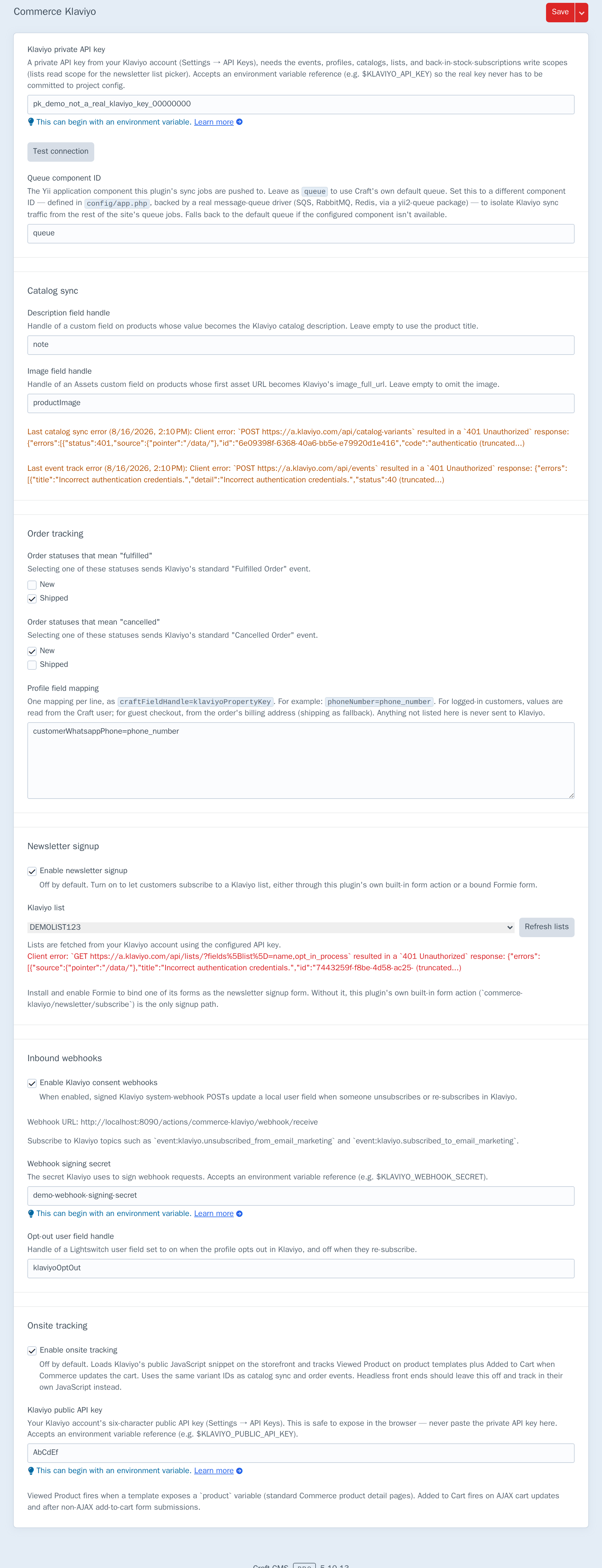
| Setting | Purpose |
|---|---|
| Klaviyo private API key | From Klaviyo → Settings → API Keys. Accepts an environment variable, e.g. $KLAVIYO_API_KEY |
| Queue component ID | Yii queue component for sync jobs (default: queue) |
| Title field | Product (or variant) field mapped to the catalog item's title. Falls back to the native Craft title |
| Description field handle | Product field mapped to the catalog item's description. Falls back to the product title |
| Image field handle | Assets field for catalog images (variant first, then product). Sets image_full_url, image_thumbnail_url, and the full images[] gallery. Omitted when unset |
| Categories field handle | Categories field whose selected categories sync as Klaviyo catalog categories (linked/unlinked on save) |
| Catalog metadata field mapping | Editable table: pick a product/variant field, map it to a Klaviyo custom_metadata key (e.g. a compare-at price) — for catalog data with no dedicated Klaviyo attribute |
| Inventory reporting threshold | Optional. When set to N, tracked variants only send real stock to Klaviyo at or below N; above N they report a high placeholder so low-inventory / back-in-stock flows ignore high-stock noise |
| Track Updated Cart | Default on. Fires Klaviyo's Updated Cart metric when an incomplete cart with an email changes line items or total |
| Order statuses that mean "fulfilled" / "cancelled" | Fire Klaviyo's standard Fulfilled Order / Cancelled Order events |
| Profile field mapping | One craftFieldHandle=klaviyoPropertyKey per line |
| Enable public track/identify actions | Opt-in; off by default. Lets anonymous Twig forms POST to the public track/identify actions |
| Enable newsletter signup | Opt-in; off by default |
| Klaviyo list | Picked from a live list loaded from your account, not typed in |
| Formie form (optional) | Bind an existing Formie form as the signup form instead of the built-in one |
| Enable Klaviyo consent webhooks | Opt-in; syncs Klaviyo unsubscribe/resubscribe events back to a Craft user field |
| Opt-out user field handle | Lightswitch field the webhook writes to |
| Enable onsite tracking | Opt-in; loads Klaviyo's browser snippet and tracks Viewed Product/Added to Cart |
| Klaviyo public API key | The public (not private) key, for onsite tracking only |
Commerce order statuses are store-defined — map your own handles (e.g. shipped, cancelled) to Klaviyo's fulfilled/cancelled metrics.
The Catalog sync tab also shows catalog health (last success, last reindex, last bulk job) and a Klaviyo lookup by Craft element ID when catalogs:read is on the API key.
Testing the connection
Test connection makes a single, read-only GET /api/accounts/ call to confirm the configured private API key actually works:

The message is whatever Klaviyo's API actually returns, so a revoked key, a typo, or a key with the wrong scopes each produce a distinguishable error rather than one generic "failed." The same check runs as php craft commerce-klaviyo/test for scripting or CI.
Historical order sync
After install (or when connecting a new Klaviyo account), backfill completed orders as events so flows and segments aren't empty on day one:
php craft commerce-klaviyo/sync-orders --from=2024-01-01 --to=2024-12-31
php craft queue/run
Or use Utilities → Klaviyo historical orders in the control panel for the same thing without a terminal. Events use each order's original dateOrdered timestamp rather than the sync time, and Klaviyo dedupes by unique_id (order number / line id), so re-running a range is safe.
Ecommerce events
The plugin uses Klaviyo's own reserved metric names so pre-built flow templates work without custom triggers:
| Metric | Fired when |
|---|---|
Started Checkout |
An incomplete cart gets an email address for the first time (once per cart) — includes a CheckoutURL back to the cart |
Updated Cart |
An incomplete cart with an email changes line items or total — not on address-only saves. Toggle: Track Updated Cart (default on) |
Placed Order |
An order is completed |
Ordered Product |
Once per line item on completion |
Fulfilled Order / Cancelled Order |
Order reaches a status you selected in settings |
Refunded Order |
On every refund transaction |
Started Checkout is inferred when the customer becomes identifiable — Commerce has no distinct "clicked checkout" event for custom or headless storefronts. It's recorded once per cart (an idempotency table, not a heuristic re-check) so re-saving the same cart never fires it twice.
Every event's profile is enriched using your profile field mapping: from the order's associated Craft user for logged-in checkout, or from the order's billing address (shipping as fallback) for guest checkout.
Run your queue worker after orders and catalog saves (php craft queue/run) or rely on Craft's default Ajax queue runner for low-traffic testing.
Abandoned-cart restore
Klaviyo flows can link back to an incomplete cart two ways:
CheckoutURLon theStarted Checkout/Updated Cartpayload — Commerce's own load-cart URL.- The plugin's own restore action —
actions/commerce-klaviyo/cart/restore?number={{ event.OrderId }}— redirects to the same load-cart URL. Completed or missing orders return a 404 instead of restoring the wrong cart.
Public track / identify actions
Off by default (Enable public track/identify actions). When enabled, anonymous Twig forms can POST to:
commerce-klaviyo/api/identify— upsert a Klaviyo profile only (queued)commerce-klaviyo/api/track— identify + an optional custom event + optional list subscribe, all queued
{% raw %}
<form method="post">
  {{ csrfInput() }}
  {{ actionInput('commerce-klaviyo/api/track') }}
  <input type="hidden" name="list" value="LIST_ID">
  <input type="email" name="email" required>
  <input type="hidden" name="event[name]" value="Completed Survey">
  <input type="hidden" name="event[unique_id]" value="survey-{{ now|date('U') }}">
  <button type="submit">Send</button>
</form>
{% endraw %}
Common fields: profile[] for extra profile properties, event[] for a custom event (name and unique_id required to fire one), list or lists[] for list IDs, and event[trackOrder] plus event[orderId] to also apply your profile field mapping from that Commerce order. List subscriptions always go through Klaviyo's double-opt-in-aware subscribe endpoint, never a create-only membership call. Because these endpoints accept arbitrary profile properties by email, keep the setting off unless a template genuinely needs it, and don't expose it on untrusted surfaces without additional controls.
Catalog sync
- Saving a product queues a Klaviyo catalog item — title,
description, and images (image_full_url,image_thumbnail_url,images[]from the configured Assets field), price, URL, published state. - Saving a variant queues a catalog variant — SKU, price, inventory quantity, the same title/description/image resolution as its product (checked on the variant first, falling back to the product, so a field configured only on the product still resolves correctly). Variant sync jobs upsert the parent catalog item first, so parallel queue workers never hit Klaviyo with orphaned variants.
- The catalog
titleuses the native Craft title unless a Title field is configured; description falls back to the title the same way. - Configured categories are linked on the catalog item; categories removed in Craft are unlinked on the next sync.
- Rows in catalog metadata field mapping copy a product/variant field's value into Klaviyo's
custom_metadataalongside the standard attributes — for project-specific data with no dedicated catalog attribute (a compare-at price, a promo flag, anything else). - Inventory movements (sales, restocks, manual adjustments) push lightweight inventory-only PATCHes — what Klaviyo's back-in-stock detection reads, without a full item resync. When an inventory reporting threshold is set, high stock is sent as a placeholder instead of the real quantity.
- Deleting a product removes its catalog item (Klaviyo cascades variants). Removing a single variant unpublishes or deletes just that catalog variant (soft-delete → unpublish; hard-delete → remove), so a discontinued size stops appearing in product blocks and stops accepting back-in-stock signups.
- Disabling a product, or a status change that makes it not-live (a future post date, a past expiry date), removes its variants from the index the same way a delete would — a
published: falsePATCH, not a resend of stale data.
Variants sync on the variant's own save event, not the parent product's — Commerce persists variants in a separate pass after the product save completes. External IDs are Craft element IDs. Integration type is $custom with catalog type $default (Klaviyo's convention for non-native integrations). HTTP calls use Klaviyo's JSON:API media type (application/vnd.api+json).
Full reindex
php craft commerce-klaviyo/reindex
Queues a full catalog resync using Klaviyo's bulk catalog create/update jobs (up to 100 resources per API call) — after first install, or to recover from Klaviyo-side data loss. Item bulk jobs are queued before variant bulk jobs; each variant chunk still ensures its parent catalog items exist before calling Klaviyo. Real-time saves on individual products/variants continue to use per-element queue jobs. A mutex blocks two reindex runs from enqueueing the same catalog concurrently.
Bulk jobs can take several minutes even for a small catalog; the plugin's poll budget and queue job ttr are sized accordingly. This only queues the jobs — run php craft queue/run (or let a worker pick them up) to actually push them to Klaviyo.
Back-in-stock subscriptions
Product pages can POST to the plugin action commerce-klaviyo/subscriptions/back-in-stock with variantId and email. This endpoint is synchronous (not queued) so customers get immediate confirmation; it uses explicit HTTP timeouts so an unresponsive Klaviyo cannot hold workers indefinitely.
Email channel only.
Under Settings → Plugins → Commerce Klaviyo → Back in stock you get a copyable Twig form snippet for standard (non-headless) product templates, plus the optional inventory reporting threshold. There is no automatic storefront injection — paste the snippet into your theme.
The public action also enforces a stock guard server-side: signups are rejected when the variant is in stock or does not track inventory (even if someone POSTs without your theme form). Klaviyo error responses are mapped to clearer customer messages (e.g. already subscribed, missing catalog variant). Optionally, enable also subscribe to a Klaviyo list to queue a marketing list signup after a successful back-in-stock request.
Newsletter signup
Off by default. Turn it on and pick a list — loaded live from your Klaviyo account via Refresh lists, not typed in, with each list's opt-in process (single vs. double) shown alongside it:

Two signup paths, both optional and both going through the same subscription logic:
- Built-in action —
commerce-klaviyo/newsletter/subscribe(no other plugin required) - Formie form — if Formie is installed, bind a form and map its email/name fields; submissions subscribe using this plugin's own API key, with no separate Formie-side Klaviyo integration to configure
Both paths queue the subscription like every other Klaviyo call except back-in-stock, and both apply your profile field mapping to the subscriber.
Profile field mapping
Map Craft field handles to Klaviyo profile property keys:
phoneNumber=phone_number
companyName=organization
Applied everywhere a profile is built: order-tracking events (from the order's Craft user, or its billing/shipping address for guest checkout) and Formie newsletter submissions (from the submitted form's own fields). Unmapped fields are never sent.
Inbound webhooks (consent sync)
Off by default. When enabled, commerce-klaviyo/webhook/receive accepts signed Klaviyo system-webhook POSTs and writes unsubscribe/resubscribe state to a Lightswitch field on the matching Craft user — verified live with real HMAC-SHA256-signed requests for both directions (event:klaviyo.unsubscribed_from_email_marketing → field set to on, event:klaviyo.subscribed_to_email_marketing → off), plus a genuinely rejected bad-signature request.
Point a Klaviyo webhook subscription (in Klaviyo's own settings) at the URL shown on the settings screen, subscribed to whichever consent topics you care about, and set a signing secret here that matches. The signature covers the raw request body plus a timestamp header, so a request can't be replayed or tampered with in transit; a webhook ID in both the header and body is cross-checked too, when present.
Onsite tracking
Off by default. Turn it on with a public API key (never the private one — this loads directly in the browser) to add Klaviyo's client-side tracking on top of the server-side events above:
Viewed Productfires when a rendered template exposes aproductvariable — standard Commerce product-detail pages, no template changes needed.Added to Cartfires on Commerce's AJAX cart-update responses, with a session-based fallback so a classic (non-AJAX) add-to-cart form still tracks correctly on the next page load.
Both use the same variant IDs as catalog sync and the server-side Ordered Product event, so onsite and backend data line up in Klaviyo. Headless front ends should leave this off and track in their own JavaScript instead — there's no server-rendered template for this plugin's snippet to attach to.
Extending payload construction
Six EVENT_BEFORE_BUILD_*_PAYLOAD events — catalog item, catalog variant, catalog inventory, track event, newsletter, back-in-stock — fire right before their respective API payload is queued or sent, each with the relevant Craft context (product/variant/order) alongside the payload itself:
use kernpfad\commerceklaviyo\CommerceKlaviyo;
use kernpfad\commerceklaviyo\events\BuildCatalogItemPayloadEvent;
use yii\base\Event;

Event::on(
    CommerceKlaviyo::class,
    CommerceKlaviyo::EVENT_BEFORE_BUILD_CATALOG_ITEM_PAYLOAD,
    function (BuildCatalogItemPayloadEvent $event) {
        $event->payload['data']['attributes']['brand'] = $event->product->getFieldValue('brand');
    }
);
This is the escape hatch for anything the settings screen doesn't cover — a computed value, a field the mapping table can't express, or overriding a key the plugin already set.
Run status
Catalog-sync and event-track failures are tracked separately and shown on the settings screen with a timestamp — visible in the screenshot above. Both categories are populated from real queue-job failures, not a synthetic status; a Klaviyo outage or a bad API key shows up here the next time something tries to sync.
The Catalog sync tab additionally surfaces catalog health: last successful catalog sync, last reindex, and last bulk job — useful after a full reindex or when diagnosing a stuck queue.
How it works
KlaviyoClient calls Klaviyo's REST API at https://a.klaviyo.com/api/ with a pinned API revision. Catalog creates use POST with PATCH fallback on 409 Conflict. Payload construction lives in dedicated, unit-tested builders (EventPayloadBuilder, CatalogPayloadBuilder, NewsletterPayloadBuilder, OnsiteTrackingPayloadBuilder) kept framework-light so they don't need a Klaviyo client or full Craft boot to test.
If the API key is missing, sync and tracking are skipped (logged) rather than sending broken requests.
Limits
- No SMS or push consent management — the inbound webhook handles email marketing consent only.
- Newsletter list caching — the list picker caches Klaviyo's response for 5 minutes; a list created moments ago in Klaviyo might not appear until that expires or you click Refresh again.
- Run status is not durably persisted — like the sync-status display, it lives in Craft's data cache; clearing caches clears it too.
- Credentials in project config — API keys and the webhook secret are stored in Craft plugin settings /
project.yamlunless set via environment variables; restrict CP access accordingly. - Onsite tracking needs a template
productvariable — a fully custom or headless product page won't triggerViewed Productautomatically.