

What it solves
Craft Commerce has product search on the storefront, but many shops want Doofinder's hosted search layer — faceted results, typo tolerance, merchandising rules, and analytics — without building a custom index pipeline.
Commerce Doofinder keeps a Doofinder search index in sync with your Commerce catalog: one Doofinder item per variant, grouped under the parent product, with automatic image and category resolution, custom field mapping, availability/stock/sale-price data, and a zero-downtime full reindex command. Doofinder's own Layer widget handles the front end; this plugin only manages the index.
Requirements
| Craft CMS | 5.0.0 or newer |
| Craft Commerce | 5.0.0 or newer |
| PHP | 8.2 or newer |
| Doofinder | Account with API token and a search engine Hash ID |
Create a store in the Doofinder Admin Panel with your public shop URL (e.g. https://kernpfad.dev), then add a search engine with Connect via API indexing. The localhost craft-lab URL is not suitable for the Doofinder store record — API sync from the lab works regardless, as long as token and Hash ID are correct.
Installation
composer require kernpfad/craft-commerce-doofinder
php craft plugin/install commerce-doofinder
Plugin settings
Open Settings → Plugins → Commerce Doofinder:
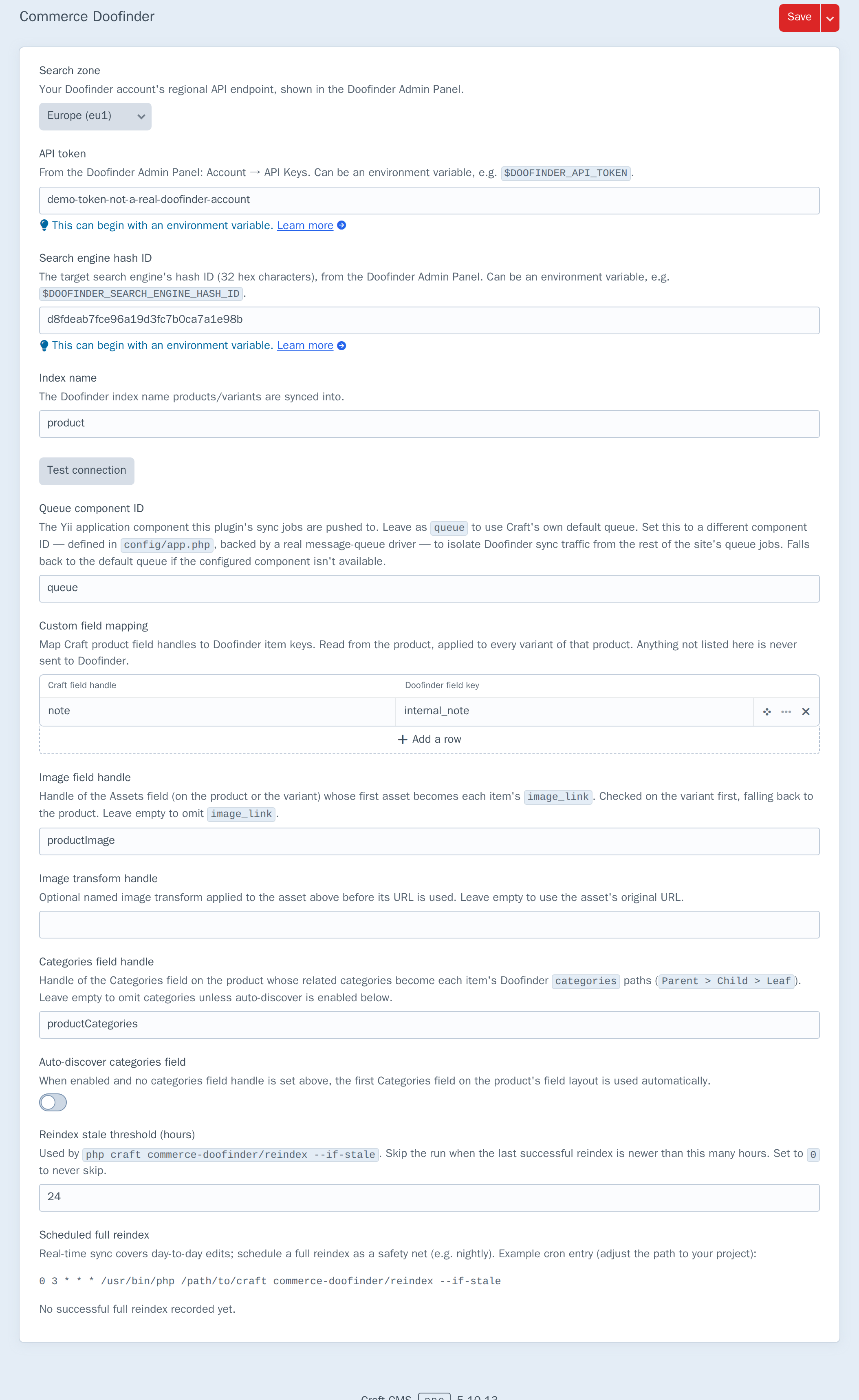
| Setting | Purpose |
|---|---|
| Search zone | Regional API endpoint — eu1, us1, or ap1 (must match your API token prefix) |
| API token | From Doofinder Admin Panel → Account → API Keys. Accepts an environment variable alias, e.g. $DOOFINDER_API_TOKEN |
| Search engine hash ID | 32-character hex ID of the target search engine — not the Store ID. Also accepts an environment variable alias |
| Index name | Doofinder index products sync into (default: product) |
| Queue component ID | Yii queue component for sync jobs (default: queue) |
| Custom field mapping | Editable table: Craft product field handle → Doofinder item key |
| Image field handle | Assets field (checked on the variant, then the product) whose first asset becomes image_link |
| Image transform handle | Optional named transform applied to that asset |
| Categories field handle | Categories field whose related categories become categories breadcrumb paths |
| Auto-discover categories field | When on and no handle is set above, use the first Categories field on the product's layout |
| Reindex stale threshold (hours) | Used by reindex --if-stale — skip a run if the last success is more recent than this |
Last sync / reindex status on the same screen shows the most recent success or failure (with detail) after real-time sync jobs and full reindexes:

The status lives in Craft's data cache (30-day TTL), not the database — clearing caches clears it too. See Limits.
Both credential fields use Craft's standard environment-variable-autosuggest field, so a real token never has to be committed to project config.
Finding the Hash ID
In the Doofinder Admin Panel, open Configuration → Search Engines (or hover a search engine in the top bar) and copy the Hash ID. It looks like d8fdeab7fce96a19d3fc7b0ca7a1e98b.
The Store ID (a UUID under General Settings) is different — the plugin needs the search engine Hash ID (32 hex characters, no dashes).
Testing the connection
Test connection fetches the configured index's own metadata — a single lightweight, read-only call — to confirm the API token, hash ID and index name are all valid together, without creating, changing or deleting anything:

The result is whatever Doofinder's API actually returns — a real, specific error (as above, for a token that doesn't correspond to a real account) rather than a generic "failed" message, so a wrong token, wrong hash ID, and wrong index name each look different and are each easy to tell apart. The same check is available as php craft commerce-doofinder/test for scripting or CI.
Real-time sync
Saving a Commerce variant queues a sync job that upserts one Doofinder item. Variants share a group_id (parent product ID); one variant is marked group_leader for result display.
A variant is removed from the index — not upserted — the moment it, or its parent product, is disabled, not live for its site (a future post date or a past expiry date), or deleted. Saving the product itself (without touching a variant) is enough to trigger this removal check too, so disabling a product from its own edit screen removes every one of its variants from the index even when Commerce doesn't fire a separate save event per variant.
Drafts, revisions, and multi-site propagation saves are all skipped — Craft creates a revision on every control-panel publish, and none of those should ever reach the live search index under their own element ID.
Sync never runs inline during a web request — a Doofinder outage cannot block product saves.
Full reindex
php craft commerce-doofinder/reindex
php craft commerce-doofinder/reindex --if-stale
php craft commerce-doofinder/reindex --if-stale --stale-hours=6
Builds a fresh index in a locked temporary index, pushes the catalog in chunks of 100 items (Doofinder's bulk limit), then swaps atomically. Search keeps hitting the old index until the swap completes.
--if-stale skips the run entirely if the last successful reindex is still newer than the configured Reindex stale threshold (or --stale-hours for that one invocation) — useful for a cron entry that runs more often than you actually want a full reindex to happen:
0 3 * * * /usr/bin/php /path/to/craft commerce-doofinder/reindex --if-stale
Run your queue worker after variant saves (php craft queue/run) or rely on Craft's default Ajax queue runner for low-traffic testing.
Custom field mapping
Map any Craft product field handle to an arbitrary Doofinder item key from the settings screen's editable table:

Values are read from the product and applied to every one of its variants. A legacy craftFieldHandle=doofinderKey-per-line format (fieldMappingRaw) is still read if the table is empty, for projects that set it directly via a config file, but the table is what the settings screen writes to now.
A mapped handle that isn't on a given product type's field layout is simply omitted from that product's payload — sync continues for the rest of the fields and for other product types. The same layout check applies to the configured Image and Categories field handles (variant first, then product for images), so a multi-type catalog does not crash when one type lacks the field.
Automatic image, category, availability, stock and sale price
Beyond the reserved Doofinder fields (id/title/link/price/group_id/group_leader), the plugin resolves several more automatically once configured:
image_link— from the Image field handle setting. The variant's own value is checked first, falling back to the product's, so a project can override the image per variant or just set it once on the product (the common case — and safe to do: a handle that only exists on the product's layout, not the variant's, is handled correctly rather than erroring). Omitted entirely if unconfigured or missing from that element's layout.categories—Parent > Child > Leafbreadcrumb paths built from the product's related categories, via the configured Categories field handle or (with Auto-discover on) the first Categories field found on the product's layout. If the configured handle is absent from a product type's layout, categories are omitted for that type instead of crashing sync.availabilityandstock_quantity— sourced from Commerce's own inventory system. An inventory-untracked variant omitsstock_quantityentirely rather than reporting a misleading0.sale_price— included whenever a variant's promotional price is genuinely lower than its base price; omitted otherwise.
None of these require configuration to keep working correctly — an unconfigured image or categories field handle just omits that key, exactly like an unmapped custom field.
Extending sync payloads
CommerceDoofinder::EVENT_MODIFY_ITEM_PAYLOAD fires for every item payload right before it's queued or bulk-indexed, with the product and variant it was built from:
use kernpfad\commercedoofinder\CommerceDoofinder;
use kernpfad\commercedoofinder\events\ModifyItemPayloadEvent;
use yii\base\Event;

Event::on(
    CommerceDoofinder::class,
    CommerceDoofinder::EVENT_MODIFY_ITEM_PAYLOAD,
    function (ModifyItemPayloadEvent $event) {
        $event->payload['brand'] = $event->product->getFieldValue('brand');
        // $event->variant is also available
    }
);
This is the escape hatch for anything the settings screen doesn't cover — computed keys, values from a relation the field-mapping table can't express, or overriding a key the plugin already set.
Front end
No search UI is included. Install Doofinder's Layer script from the Doofinder Admin Panel on your public site. The plugin only maintains the index.
How it works
DoofinderClient calls Doofinder's Management API v2 at https://{zone}-api.doofinder.com. Creates use POST with PATCH fallback on 409 Conflict. Bulk writes during reindex target the temporary index while a lock is active.
Sync hooks Variant::EVENT_AFTER_SAVE, not Product::EVENT_AFTER_SAVE — verified against a real save that a product's variants aren't persisted yet (no ID, nothing found on a fresh query) at the moment the product's own save event fires. Product::EVENT_AFTER_SAVE is still used, but only to check whether the product itself just became disabled, pending, or expired, in which case every one of its variants is queued for removal.
If API token or Hash ID is missing, sync is skipped (logged) rather than sending broken requests.
Limits
- Variant-level sync only — hooks
Variant::EVENT_AFTER_SAVE, not Product save (Commerce persists variants in a separate pass); saving only the product still triggers the disabled/pending/expired removal check, just not a full payload rebuild. A variant is indexable when its product is live; variants themselves only report enabled/disabled (no post/expiry of their own). - Missing field handles are omitted, not fatal — see Custom field mapping above. A typo still means that key never reaches Doofinder, so check handles against the product layouts you care about.
image_linkandcategoriesneed configuration — nothing is guessed beyond the handles you set (or auto-discovery for categories, if enabled).- Sync status is not durably persisted — the "Last sync / reindex status" shown on the settings screen lives in Craft's data cache (30-day TTL), not the database; clearing caches clears it too.
- Credentials in project config — the API token is stored in Craft plugin settings /
project.yamlunless set via an environment variable; restrict CP access accordingly. - Test connection requires an admin account — the control panel button (not the console command) is gated by Craft's
requireAdmin(), not just plugin-settings access. - Catalog image path — verify asset URL resolution with a real volume before going live.