
What it solves
Craft CMS has no built-in newsletter integration. CleverReach handles campaigns and automations, but you still need a GDPR-compliant signup path on your site, proof of consent on your side, optional attribute sync, and — with Commerce — order data for post-purchase flows.
CleverReach connects Craft to the CleverReach REST API with double opt-in signup, a local consent log, Craft user linking, optional Commerce order push, and a product catalog endpoint for CleverReach's My Content editor.
Requirements
| Craft CMS | 5.0.0 or newer |
| PHP | 8.1 or newer |
| CleverReach | OAuth app with Client Credentials grant (Account → Extras → REST API) |
| Craft Commerce | optional — required only for order push and the product catalog |
The plugin authenticates server-side with client ID + secret. There is no browser OAuth redirect — the authorize URL from the CleverReach developer console is not used.
Store credentials as environment variables; the control panel holds only the variable names:
CLEVERREACH_CLIENT_ID="..."
CLEVERREACH_CLIENT_SECRET="..."
Installation
composer require kernpfad/craft-cleverreach
php craft plugin/install cleverreach
Installation creates the cleverreach_consentlog table for consent records independent of CleverReach's own double opt-in log, and cleverreach_user_sync for last attribute-sync status / DOI confirmation flag per Craft user.
Plugin settings
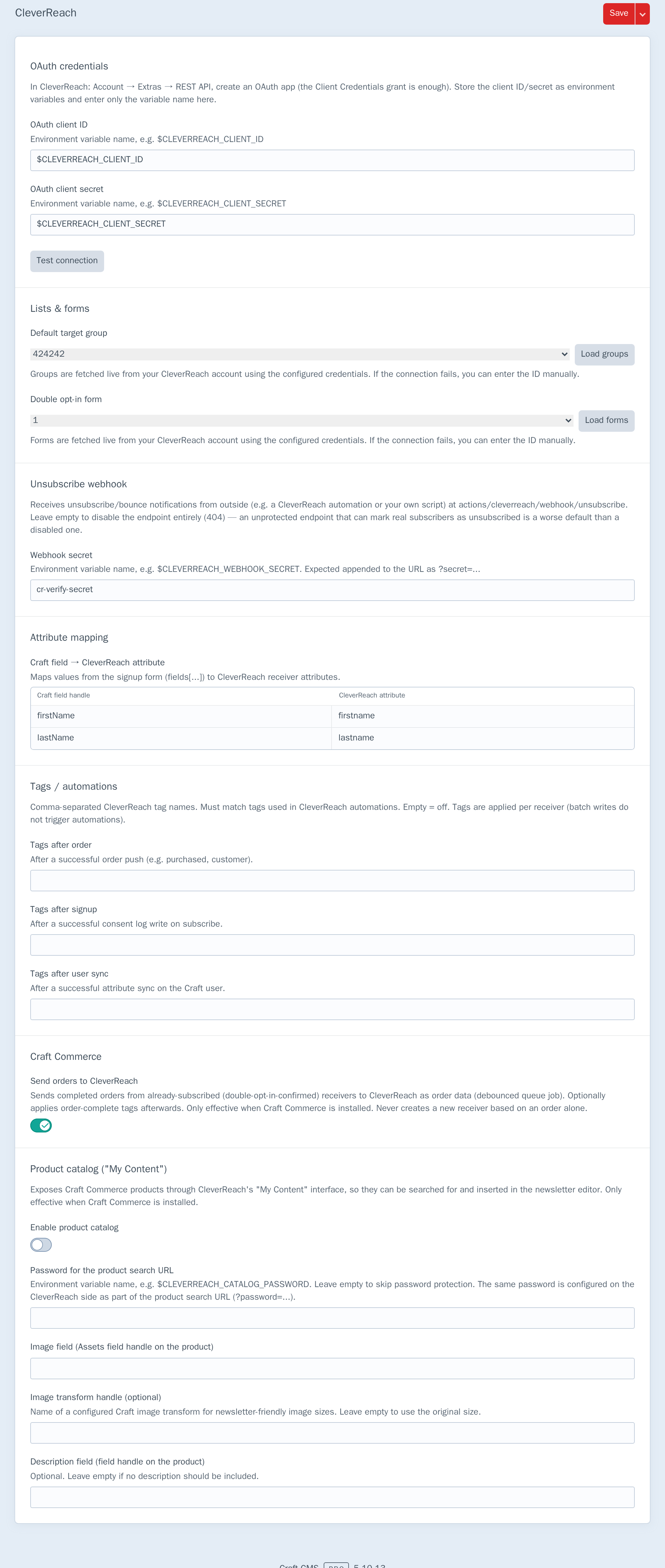
Open Settings → Plugins → CleverReach:
OAuth credentials
| Field | Purpose |
|---|---|
| OAuth Client ID | Env var name, e.g. $CLEVERREACH_CLIENT_ID |
| OAuth Client Secret | Env var name, e.g. $CLEVERREACH_CLIENT_SECRET |
Test connection makes a single lightweight, read-only API call (the same one the Formie integration's list picker already relies on) to verify the configured credentials actually work — no receiver is created, no email is sent, nothing on the CleverReach account changes. The same check is available from the console:
php craft cleverreach/test
Whenever an API or OAuth token call fails — most commonly triggered by a site visitor's subscribe attempt, not an admin action — the message and timestamp are recorded and shown as a Last API error banner at the top of this screen the next time it loads, in addition to the usual Craft::error() log entry. The message is already secret-free (client ID/secret and access tokens are never interpolated into it) before it's stored, so there's nothing sensitive to worry about surfacing here. A successful Test connection clears it, so the banner reflects current reality rather than a stale failure from before the credentials were fixed.
Lists & forms
| Field | Purpose |
|---|---|
| Default target group | CleverReach group new receivers join |
| Double opt-in form | Form CleverReach uses to send the confirmation mail |
Default target group and Double opt-in form are pickers, not free-text fields: Load groups / the forms endpoint fetch live from the connected account (GET /groups, GET /forms) and fill the dropdowns with real names — no more copying numeric IDs out of the CleverReach UI by hand. Both still store a plain ID underneath, so existing installs with a manually-entered ID keep working; if the API is unreachable, a manual ID text fallback remains available.
Group ID and DOI form ID are required together — a group without a DOI form would create inactive receivers who never receive a confirmation mail.
Attribute mapping
Maps signup form fields (fields[handle]) to CleverReach receiver attributes. The same mapping is used when syncing Craft users who already have a consent record.
Craft Commerce
| Setting | Purpose |
|---|---|
| Send orders to CleverReach | Push completed orders for subscribers who already opted in. Never creates a new receiver from an order alone. |
| Order-complete tags | Optional comma-separated CleverReach tags applied after a successful order push (see Tags / automations) |
| Enable product catalog | Expose Commerce products to CleverReach My Content |
| Catalog password | Optional env var for ?password= on the catalog URL |
| Image / description field handles | Product fields used in catalog search results |
Also under settings (not Commerce-only): Subscribe tags and User sync tags — see Tags / automations.
Newsletter signup
POST any front-end form to the subscribe action:
{% raw %}
<form method="post">
    {{ csrfInput() }}
    {{ actionInput('cleverreach/subscribe/subscribe') }}
    {{ redirectInput('thanks') }}

    <input type="email" name="email" required>
    <label>
        <input type="checkbox" name="consent" value="1" required>
        I would like to receive the newsletter.
    </label>
    <input type="hidden" name="consentTextVersion" value="2026-07">
    <input type="text" name="fields[firstName]">
    <button type="submit">Subscribe</button>
</form>
{% endraw %}
The receiver is created at CleverReach as inactive, the double opt-in mail is triggered, and a consent record (email, IP, source, timestamp, consent text version) is written to cleverreach_consentlog.
User profile
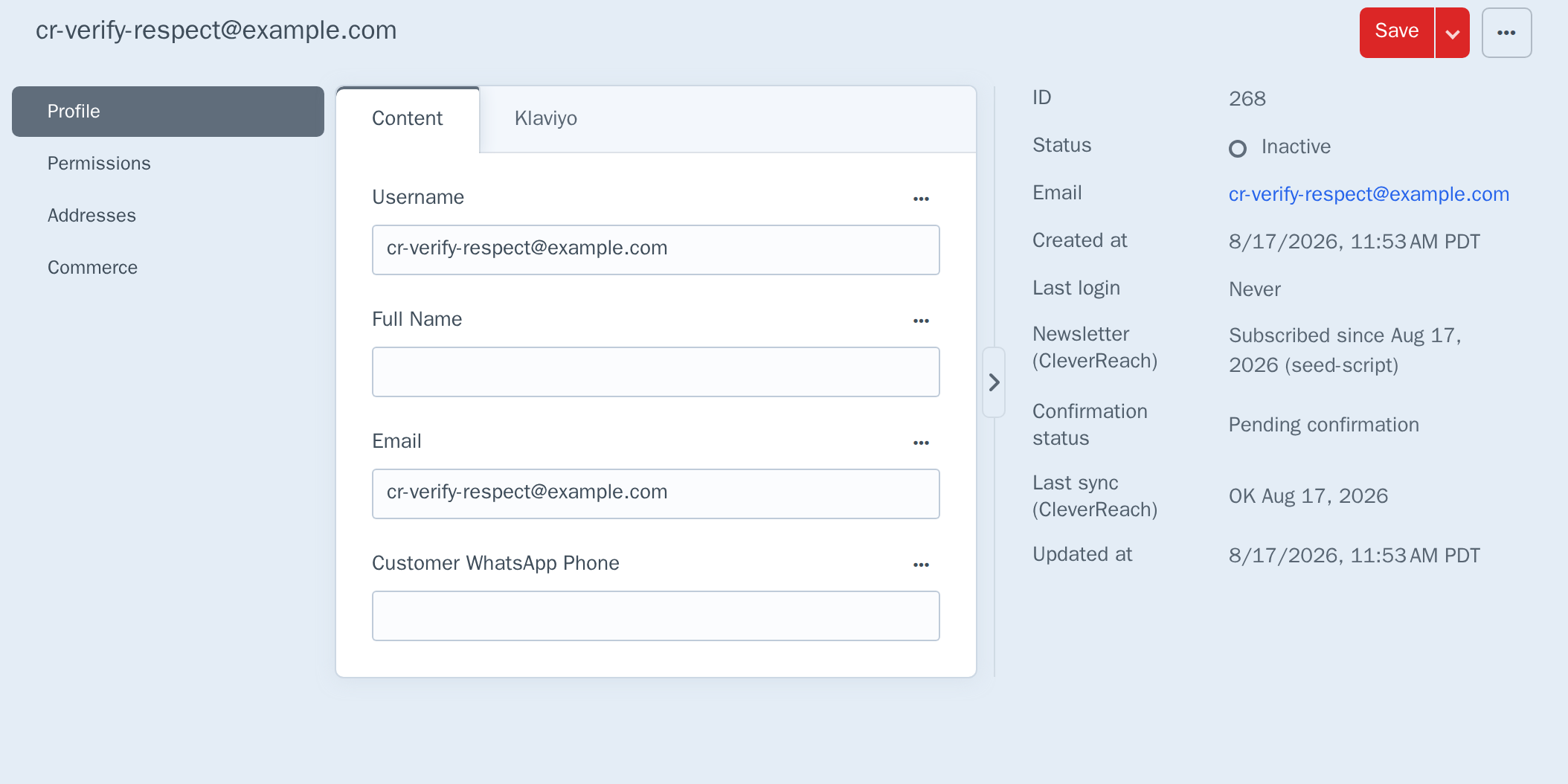
When a Craft user has a matching consent log entry, the user edit screen shows newsletter status in the Details pane:
Saving a user syncs mapped attributes to CleverReach — but only if consent already exists, and only if the receiver isn't unsubscribed (see below). Saving never creates a new subscription.
Three more lines can appear beneath Newsletter (CleverReach), depending on state:
| Line | Shown when | Meaning |
|---|---|---|
| Newsletter status: Unsubscribed date | An unsubscribe/bounce notification was received (see Unsubscribe webhook below) | Replaces the two lines below — an unsubscribed address is never shown as pending or confirmed |
| Confirmation status | Not unsubscribed | Confirmed date once CleverReach reports the receiver as double-opt-in confirmed, otherwise Pending confirmation |
| Last sync (CleverReach) | At least one sync has been attempted | OK date, or Error date: message if the last attempt failed |
The confirmation and sync lines come from the same place a save's attribute sync checks: before pushing an update, the plugin looks up the receiver's actual state on CleverReach via GET groups/{id}/receivers/{email} rather than assuming its own local consent record is still accurate. A receiver that's still sitting in "pending DOI" on CleverReach's side is never force-activated by a Craft user save — attributes are soft-synced with activated: false so profile data is not lost before confirmation, the sync records as a normal successful sync (Last sync: OK) without activating the receiver, and Confirmation status keeps showing Pending confirmation until CleverReach itself reports the DOI mail was confirmed.
Saving a Craft user does not call CleverReach inline. It enqueues a debounced SyncUserJob (userId only, short delay + cache gate) so later profile edits inside the window are included when the worker runs, and a CleverReach outage never blocks the save. A queue worker must be running (php craft queue/listen or equivalent) for sync to complete. Last sync outcome lives on cleverreach_user_sync, not on the consent log.
Unsubscribe webhook
CleverReach's REST API doesn't push unsubscribe/bounce notifications on its own — this plugin exposes an endpoint for whatever does, in your setup: a CleverReach-side automation calling out, a Zapier-style integration, or a script reacting to a CleverReach export. Configure a Webhook secret under Settings → Plugins → CleverReach → Unsubscribe webhook (an env var reference, same as the OAuth credentials), then point that thing at:
POST https://your-domain.tld/index.php?p=actions/cleverreach/webhook/unsubscribe&secret=YOUR_SECRET
  email   (required)
  reason  (optional, free text, e.g. "bounced")
curl -X POST "https://your-domain.tld/index.php?p=actions/cleverreach/webhook/unsubscribe&secret=YOUR_SECRET" \
  --data-urlencode "email=someone@example.com" \
  --data-urlencode "reason=bounced"
A matching consent record gets its unsubscribedAt timestamp set and Plugin::EVENT_RECEIVER_UNSUBSCRIBED fires; an email with no consent record on file returns a plain success without creating one (nothing to mark). No Webhook secret configured means the endpoint 404s entirely rather than accepting unauthenticated requests — a worse default here is a disabled endpoint, not an open one that can mark real subscribers as unsubscribed.
Once marked, both the attribute-sync-on-user-save and the Commerce order push skip that address — see User profile above and Commerce order push below.
Formie integration
With Formie installed, a CleverReach (Double Opt-in) integration appears under Formie's email marketing integrations. Unlike Formie's built-in CleverReach connector, this path always uses double opt-in, central plugin credentials, and the consent log.
Commerce order push
When enabled, every completed order (Order::EVENT_AFTER_COMPLETE_ORDER) enqueues a debounced PushOrderJob (orderId only, short delay + cache gate). The worker checks the consent log and pushes order data — number, date, total, line items — only when consent already exists, the address is not unsubscribed, and the receiver is DOI-confirmed. A still-pending receiver is never force-activated by an order. A new recipient is never created from an order alone. A queue worker must be running for the push to complete. A CleverReach failure during push is logged and never breaks order completion.
Optional order-complete tags (settings) are applied only after a successful push, in the same job, so CleverReach automations (THEA) can react — tags are set one receiver at a time; batch tagging does not trigger automations.
Automations (welcome mail, reactivation, post-purchase) are configured in CleverReach — this plugin supplies the data and optional tags.
Tags / automations
Under Settings → Plugins → CleverReach you can set comma-separated CleverReach tag names for:
| Setting | When |
|---|---|
| Order-complete tags | After a successful queued order push |
| Subscribe tags | After a successful subscribe/consent write |
| User sync tags | After a successful user attribute sync |
Projects can also call Plugin::getInstance()->tags->apply($email, $tags, $context) or listen to Plugin::EVENT_BEFORE_APPLY_TAGS to mutate or cancel tags before they are sent.
Product catalog (My Content)
When Commerce is installed and the catalog switch is on, CleverReach can search your shop from the campaign editor. Configure the search URL in CleverReach under My Content:
https://your-domain.tld/index.php?p=actions/cleverreach/catalog/search&password=YOUR_PASSWORD
The endpoint is read-only, runs without CSRF (CleverReach's servers call it), and is secured by the optional password.
Importing existing contacts
php craft cleverreach/import/users --consentMode=require-consent --consentField=newsletterOptIn --confirm
php craft cleverreach/import/customers --consentMode=doi --confirm
php craft cleverreach/import/csv --file=/path/legacy.csv --mapping="E-Mail:email,First name:firstname" --consentMode=require-consent --confirm
Without --confirm every run is a dry run. Consent mode is chosen per run:
| Mode | Behaviour |
|---|---|
require-consent |
Import only contacts with demonstrable existing consent |
doi |
Create inactive receivers; CleverReach sends confirmation mail |
activate |
Activate immediately — requires --acceptResponsibility=1 |
Extending: modifying the receiver payload
Every receiver upsert — signup, activation, order push — funnels through the same internal call, and fires Plugin::EVENT_MODIFY_RECEIVER_PAYLOAD immediately before it, with the group ID, email, activation flag, and the payload about to be sent:
use kernpfad\cleverreach\events\ModifyReceiverPayloadEvent;
use kernpfad\cleverreach\Plugin;
use yii\base\Event;

Event::on(
    Plugin::class,
    Plugin::EVENT_MODIFY_RECEIVER_PAYLOAD,
    function (ModifyReceiverPayloadEvent $event) {
        // $event->groupId, $event->email, $event->activated are read-only context.
        $event->payload['attributes']['SIGNUP_SOURCE'] = 'website';
    }
);
A listener can add or override anything under $event->payload — most usefully attributes, CleverReach's per-receiver custom field values — without touching this plugin's core. The mutated payload is what actually gets sent; there's no way to prevent the upsert itself from this event (cancel earlier, e.g. by not calling subscribe()/activateReceiver() in the first place, if that's what you need).
Permissions
CleverReach settings require a Craft admin — including loading groups/forms for the pickers (cleverreach/cp/groups/index, cleverreach/cp/forms/index), which are admin-only CP actions, not separately assignable permissions. There is no separate plugin permission — configure under Settings → Plugins.
The unsubscribe webhook is a site action, not a CP route — it's authenticated by its own shared secret (see Unsubscribe webhook above), independent of Craft user permissions entirely.
How it works
- OAuth: Client Credentials grant against
https://rest.cleverreach.com/oauth/token.php. Access tokens are cached and re-requested on expiry — nothing is stored in the database. - Receivers: Created via
groups/{id}/receivers/upsertas inactive for signup; activated only through CleverReach's DOI confirmation.Plugin::EVENT_MODIFY_RECEIVER_PAYLOADfires immediately before every upsert — see Extending: modifying the receiver payload above. - Consent log: Local proof of who opted in, when, from where, and which consent text version they saw — plus unsubscribe timestamp for that address.
- User sync table:
cleverreach_user_syncholds last sync status / DOI confirmation flag per Craft user (separate from the consent log). - User sync: saving a Craft user enqueues
SyncUserJob; the worker checks the receiver's real state on CleverReach (GET groups/{id}/receivers/{email}) before syncing, soft-updates pending DOI receivers, and never blocks the Craft save — see User profile above. - Order push: completed orders enqueue
PushOrderJob; tags after a successful push only — see Commerce order push and Tags / automations above. - Error visibility: every API and OAuth token request funnels through the same internal
request()/requestAccessToken()wrappers. A failure there both logs viaCraft::error()and records a sanitized message + timestamp to cache for the Last API error banner; a successful Test connection clears it.
Limits
- Craft CMS 5 only.
- Client Credentials only — no authorization-code OAuth flow or per-user CleverReach login in Craft. Deliberately out of scope: nothing in this plugin's use cases (signup, sync, order push) needs a browser-based authorize flow, and Client Credentials stays the simpler default.
- No CleverReach UI in Craft beyond plugin settings and user metadata — campaigns, templates, and automations stay in CleverReach.
- Order push and catalog require Commerce and the respective settings switches.
- Catalog image handling should be verified once with a real assets volume before going live.
- Shop owner responsibility for valid consent — a phone number or order email alone is not consent. The plugin does not ship a consent/recipient-resolution layer for arbitrary custom fields beyond the documented signup and import paths.
- CleverReach API scope on your OAuth app may restrict which endpoints work (e.g. listing groups/forms). Group and form IDs are copied from the CleverReach UI, or picked live via the pickers once your OAuth app can list them.
- Queue worker required for user attribute sync and Commerce order push — both are debounced Craft queue jobs; without a worker they sit until one runs.
- One error, not a log. The Last API error banner holds only the single most recent failure — there's no history of past errors, and it's overwritten by whatever fails next. Per-user Last sync on the user profile is likewise only ever the most recent attempt for that address.
- No signature verification on the unsubscribe webhook. The shared secret in the URL is the only authentication — treat it like a password (HTTPS only, don't log the full URL) rather than expecting a cryptographic request signature.